
 SwingMatch
  Calendly
 Stop Hacking Calendly. Switch to the Scheduler Built for Golf.
Stop hacking generic software to run your golf business. Discover the scheduler that tracks lesson packages, manages student history, and automates your admin—so you can focus on teaching.
The Short Version
| SwingMatch | Calendly | |
|---|---|---|
| Best for | Golf instructors | General scheduling |
| Payments | ✓ Built-in with Stripe | ~ Add-on integration |
| Lesson packages | ✓ Yes, with balance tracking | ✗ No |
| Student management | ✓ Golf-specific profiles | ~ CRM-style contacts |
| Lesson notes & video | ✓ Yes | ✗ No |
| Discovery / Marketplace | ✓ Yes | ✗ No |
| In-app chat | ✓ Yes | ✗ No |
| Booking questionnaires | ✓ Custom questions at booking | ~ Routing forms (paid plans) |
| Starting price | Free / $37/mo | Free / $10/mo |
Bottom line: Calendly is a great general scheduling tool. SwingMatch is purpose-built for golf instruction. If you just need a booking link, Calendly works. If you want to run your entire teaching business from one place, SwingMatch is designed for that.
What Calendly Does Well
Let's be fair — Calendly is popular for good reason:
- ✓ Dead simple to set up. You can have a booking link in minutes.
- ✓ Clean booking experience. Students see your availability and book easily.
- ✓ Integrates with everything. Google Calendar, Zoom, Outlook, Stripe, PayPal.
For consultants, salespeople, and anyone who just needs "pick a time and meet," Calendly is excellent.
A Note on Setup Speed
Calendly is famous for fast setup. But let's break that down:
0 to 1 (your first booking link)
Both Calendly and SwingMatch get you there in minutes. Similar speed.
1 to 100 (full setup with all services)
SwingMatch is significantly faster. Golf lesson types are pre-built. What takes an hour in Calendly takes 15 minutes in SwingMatch.
Ongoing changes
SwingMatch's additive model means adapting on the fly is easy. Tournament next week? Don't add availability. New clinic? A few clicks, not a blank form.
The Fundamental Difference: How Schedules Work
This might be the most important difference, and it's invisible on feature comparison charts.
Calendly: Subtractive Scheduling
Assumes you're available during set hours and you block out times you're not available.
- • Tournament Tuesday? Block it.
- • Pro shop duty? Block it.
- • Member event? Block it.
- • You're constantly playing defense.
SwingMatch: Additive Scheduling
Start with nothing, add when you're actually free.
- • Open Tuesday morning? Add a block.
- • 9-5 Monday to Friday? No problem.
- • Same next week? Copy it.
- • Tournament week? Add nothing.
- • Works with your schedule.
Here's how easy it is to set your availability in SwingMatch:
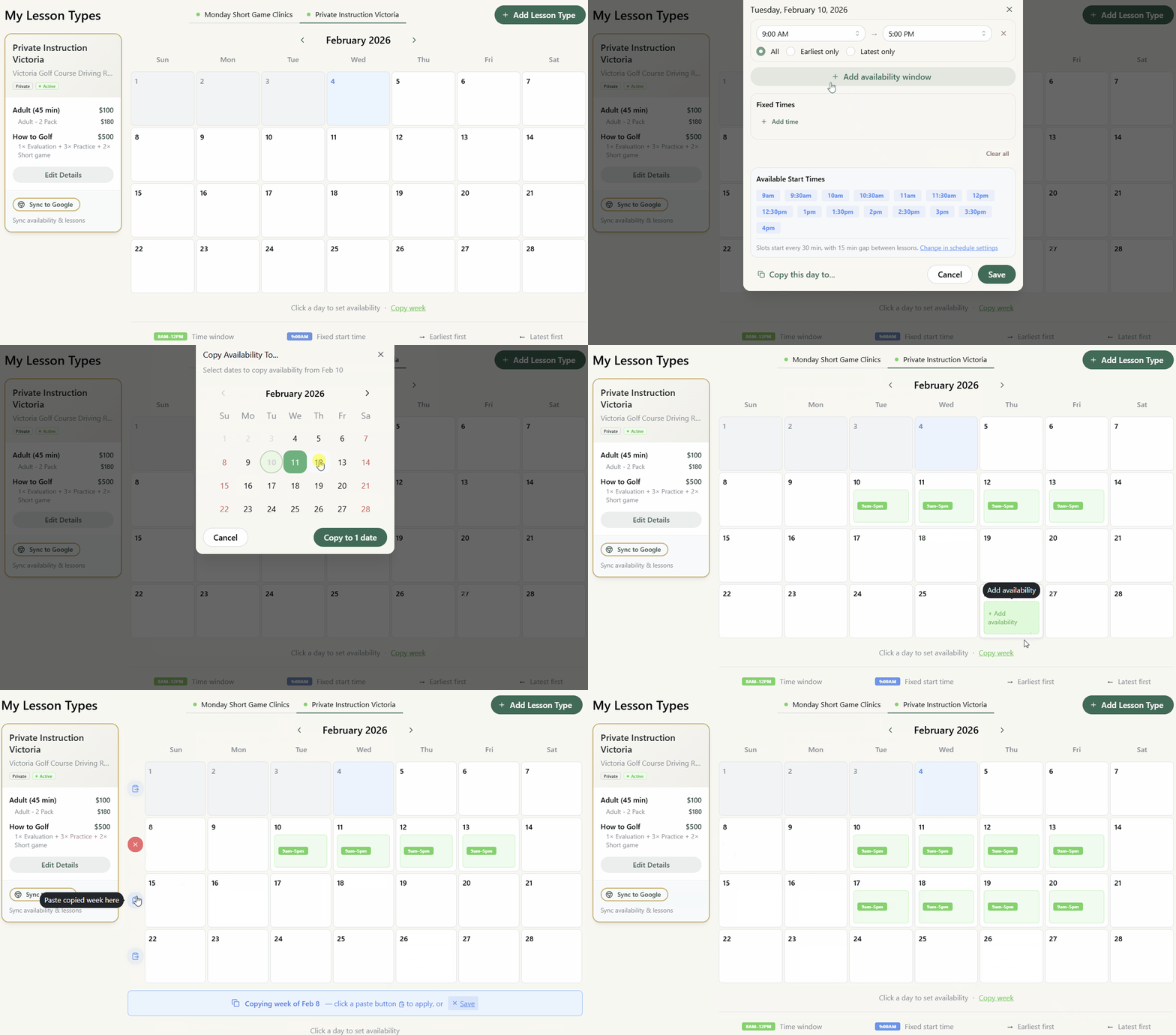
As Deneb put it, his schedule is "always changing depending on the tournaments and events." An additive system means you're not constantly fighting your calendar.
Where Calendly Falls Short for Golf Pros
1 No Lesson Packages
Most golf instructors sell lesson packages — 5-packs, 10-packs, seasonal bundles. Calendly has no concept of this.
With Calendly:
- ✗ Track balances manually
- ✗ Remember who has credits
- ✗ Risk giving away free lessons
With SwingMatch:
- ✓ Automatic balance tracking
- ✓ Students see remaining credits
- ✓ No spreadsheets required
2 Payments: Similar Setup, Different Capabilities
To be fair, both Calendly and SwingMatch use Stripe for online payments. The setup process is similar.
Where they differ:
Calendly
- ~ Per-booking payments only
- ✗ No offline payment tracking
- ~ Feels bolted together
SwingMatch
- ✓ Package sales + balance tracking
- ✓ Track cash, e-transfer, online
- ✓ Option to pass fees to students
Keep 100% of Your Rate
Both platforms use Stripe (2.9% + $0.30 per transaction). With Calendly, that fee comes out of your pocket. Charge $100, receive ~$97.
SwingMatch gives you the option to add a 3.5% + $0.30 booking fee that students pay. This covers Stripe's fee plus edge cases (international cards, after-tax processing).
The math: $5,000/month in payments = ~$150 in Stripe fees. With the booking fee enabled, that $150 stays in your pocket — more than covering SwingMatch Pro ($37/mo).
3 CRM Contacts vs. Student Profiles
Calendly has a "Contacts" section — but it's built like a CRM for sales teams, not coaching relationships.
| Feature | SwingMatch Profiles | Calendly Contacts |
|---|---|---|
| Scheduling activity | ✓ | ✓ |
| Contact info | ✓ | ✓ |
| Lesson history with context | ✓ | ✗ |
| Session notes | ✓ | ✗ |
| Package balances | ✓ | ✗ |
| Swing videos & drills | ✓ | ✗ |
| In-app messaging | ✓ | ✗ |
4 No Lesson Notes or Video
After a lesson, where do your notes go? With Calendly, you're on your own — maybe a Google Doc, maybe your phone's notes app, maybe nowhere.
SwingMatch: Add lesson notes directly to each session. Share swing videos, drills, and homework. Students can access their notes anytime.
5 No Discovery or Easy Sharing Tools
Calendly doesn't help students find you. You need to drive all your own traffic.
SwingMatch: Instructors are listed in a searchable marketplace. Plus, SwingMatch auto-generates a QR code for your profile — perfect for business cards, the academy wall, or a sign at the driving range.
"The QR code at my academy wall gets a lot of use — it's so easy." — Deneb Rondinone
6 Setup Time and Service Display
Most golf instructors offer more than "a lesson":
- • Adult private lessons (30, 45, or 60 min)
- • Junior private lessons
- • Group clinics
- • On-course playing lessons
- • Club fitting sessions
- • Multiple package options
Calendly
Each event type created manually from scratch. With 8-10 services, the page becomes a wall of text. Students scroll, get confused, pick the wrong one.
SwingMatch
Golf lesson types are pre-built. Set your prices and durations. The booking page displays services clearly with categories students understand.
7 90+ Integrations (Built for a Different Business)
Calendly boasts 90+ integrations: Salesforce, HubSpot, Marketo, SCIM provisioning... Most golf instructors will only ever use:
- ✓ Google/Outlook Calendar sync
- ✓ Stripe for payments
The rest solve problems golf instruction businesses don't typically have. This isn't a knock on Calendly — it's just built for a different type of business.
Feature Comparison
The Full Comparison
| Feature | SwingMatch Pro | SwingMatch Free | Calendly $10 | Calendly Free |
|---|---|---|---|---|
| Booking link | ✓ | ✓ | ✓ | ✓ |
| Calendar sync | ✓ | ✓ | ✓ | ✓ |
| Multiple event types | All + custom | Adult & Junior | Unlimited | 1 only |
| Online payments | ✓ (no fee) | ✓ (10% fee on online) | ✓ | ✗ |
| Package tracking | ✓ | ✓ | ✗ | ✗ |
| Student profiles | ✓ | ✓ | ✗ | ✗ |
| Lesson notes | ✓ | ✓ | ✗ | ✗ |
| Video sharing | ✓ | ✗ | ✗ | ✗ |
| Marketplace | ✓ | ~ | ✗ | ✗ |
Pricing Comparison
Calendly
- Free: $0 — 1 event type, no payments
- Standard: $10/mo — unlimited events, Stripe
- Teams: $16/mo — round robin, routing
- Enterprise: $15k+/yr — SSO, SCIM
SwingMatch
- Free: $0 — 1 location, 10% fee on online payments only
- Pro: $37/mo (annual) — all features, no fee
- Academy: $1,499/yr — 6 Pro accounts
The Hidden Admin Tax
If you're using Calendly plus manual workarounds:
| Manual package tracking | ~1 hr/week |
| Sending notes via email/text | ~1 hr/week |
| Payment coordination | ~30 min/week |
| Total admin time | ~10 hrs/month |
At $100/hr lesson rate, that's $1,000 in potential billable time.
Who Should Use Calendly?
Let's be fair — Calendly might be the right choice if you:
- ✓ Have predictable, consistent availability — same hours every week
- ✓ Don't care about lesson follow-ups — no notes, no progress tracking
- ✓ Are fine with separate apps — email, spreadsheets, notes app
- ✓ Don't sell packages — every lesson is a one-off transaction
Important: If you only teach ~20 lessons per year, any scheduling tool might be overkill. Once you're teaching 50+ lessons/year, a scheduling tool starts paying for itself.
Who Should Use SwingMatch?
SwingMatch is built for you if you:
- ✓ Teach 50+ lessons per year and want to get organized
- ✓ Have a variable schedule — tournaments, events, changing availability
- ✓ Sell lesson packages and are tired of tracking balances manually
- ✓ Want everything in one place — scheduling, payments, notes, communication
- ✓ Care about lesson continuity — review notes before a student arrives
- ✓ Offer multiple service types — private, group, junior, on-course
- ✓ Want easy marketing tools — QR codes, booking links, marketplace
Real Talk: A Golf Pro Who Switched
Deneb Rondinone is a teaching professional at Tsawwassen Golf Club in British Columbia. He used Calendly before switching to SwingMatch:
"I wouldn't say it saves me any more time than Calendly would per se, but just the functionality of it saves me stress. It formats better than Calendly—it's not just a generic kind of meeting. It's really perfect for golf."
His honest assessment:
- Time savings: About the same as Calendly for basic scheduling
- Stress reduction: Significantly better — golf-specific organization
- New students: Record year, partly from the QR code at the range
- What Calendly couldn't do: Handle different lesson types, track packages, keep everything golf-specific
Making the Switch
If you're currently using Calendly:
- You won't lose anything. Your Google/Outlook calendar stays the same. SwingMatch syncs with it just like Calendly does.
- Student transition is easy. Share your new booking link. Students adapt quickly when the new system is better.
- Start with the free tier. Test it with a few students before committing.
Final Thoughts
Calendly is a fantastic scheduling tool. If scheduling is all you need, it's hard to beat.
But golf instruction isn't just scheduling. It's packages, payments, student relationships, lesson notes, and building a practice over time. For that, you need a tool built for the job.
SwingMatch costs more than Calendly's base price because it does more. The question isn't "which is cheaper?" — it's "which helps me run my business better?"
Frequently Asked Questions
I'm worried about switching. Will I lose my bookings? ▼
Can I still sync with my personal Google Calendar? ▼
Is it more expensive than Calendly? ▼
Do my students have to pay for SwingMatch? ▼
How does package tracking actually work? ▼
Try Both
The best way to decide is to try them:
- Calendly — Free tier available
- SwingMatch — Free tier available, 14-day Pro trial
Set up both, book a few lessons through each, and see which fits how you actually work.
More Comparisons


Ready to Try SwingMatch?
Join instructors who've simplified their booking and grown their business.
Get Started Free