
 SwingMatch
  Acuity Scheduling
 Acuity Works for Salons. SwingMatch Was Built for Golf.
Golf instruction isn't a one-time appointment—it's a relationship. SwingMatch keeps your students' history, notes, and balances in one place so every lesson picks up where you left off.
The Short Version
| SwingMatch | Acuity | |
|---|---|---|
| Best for | Golf instructors | General business scheduling |
| Payments | ✓ Built-in Stripe | ✓ Stripe/Square/PayPal |
| Package tracking | ✓ Automatic (no codes) | ~ Code-based redemption |
| In-app messaging | ✓ | ✗ |
| Video notes | ✓ | ✗ |
| Booking priority | ✓ | ✗ |
| Marketplace | ✓ | ✗ |
| Booking questionnaires | ✓ Custom questions at booking | ✓ Intake forms |
| Resource booking | ✗ | ✓ |
| Gift cards | ✗ | ✓ Standard ($27-34/mo) |
| Price (with packages) | Free / $37/mo | $27-34/mo (no free tier) |
Bottom line: Acuity is built for salons and wellness businesses. SwingMatch is built for golf instruction — with automatic package tracking, lesson notes, and in-app chat.
What SwingMatch Was Built For
SwingMatch was designed specifically for golf instruction — not salons, not consultants, not fitness studios. Every feature exists because a golf pro needed it:
- ✓ Automatic package tracking. Students buy a 5-pack, book lessons, and the balance updates automatically. No codes, no manual tracking.
- ✓ In-app messaging. Communicate with students directly — no more scattered texts and emails.
- ✓ Lesson notes and video. Attach notes, photos, and video to each student's record so every lesson picks up where you left off.
- ✓ Booking questionnaires. Ask custom questions when students book so you're prepared before they arrive.
- ✓ Marketplace discovery. Students find you through city-level search pages — new students without any marketing effort on your part.
- ✓ Booking priority. Existing students can book before the public — reward loyalty without managing waitlists.
These aren't add-ons or workarounds. They're core features built for how golf instruction actually works.
What Acuity Does Well
Acuity Scheduling (owned by Squarespace) is one of the more feature-complete general scheduling tools on the market:
- ✓ Gift certificates. Clients can buy lessons as gifts — great for holidays and Father's Day.
- ✓ Subscriptions/memberships. Recurring billing for ongoing lesson programs.
- ✓ Multiple payment processors. Stripe, Square, and PayPal supported.
- ✓ Resource booking. Book rooms, bays, or equipment alongside appointments — useful for academies.
- ✓ Squarespace integration. If you already use Squarespace for your website, it's seamless.
For salons, massage therapists, fitness studios, and wellness practitioners, Acuity is genuinely excellent.
The Scheduling Model: Additive vs. Subtractive
This is one of the biggest practical differences between the two platforms.
SwingMatch: Additive Scheduling
Start with nothing, add when you're actually free.
- • Open Tuesday morning? Add a block.
- • 9-5 Monday to Friday? No problem.
- • Same next week? Copy it.
- • Tournament week? Add nothing.
- • Works with your schedule.
Acuity: Subtractive Scheduling
You're available 8am-6pm, then you block out conflicts.
- • Member event Saturday? Block it.
- • Tournament week? Block each day.
- • Pro shop duty Thursday? Block it.
- • You're constantly playing defense.
Here's how easy it is to set your availability in SwingMatch:
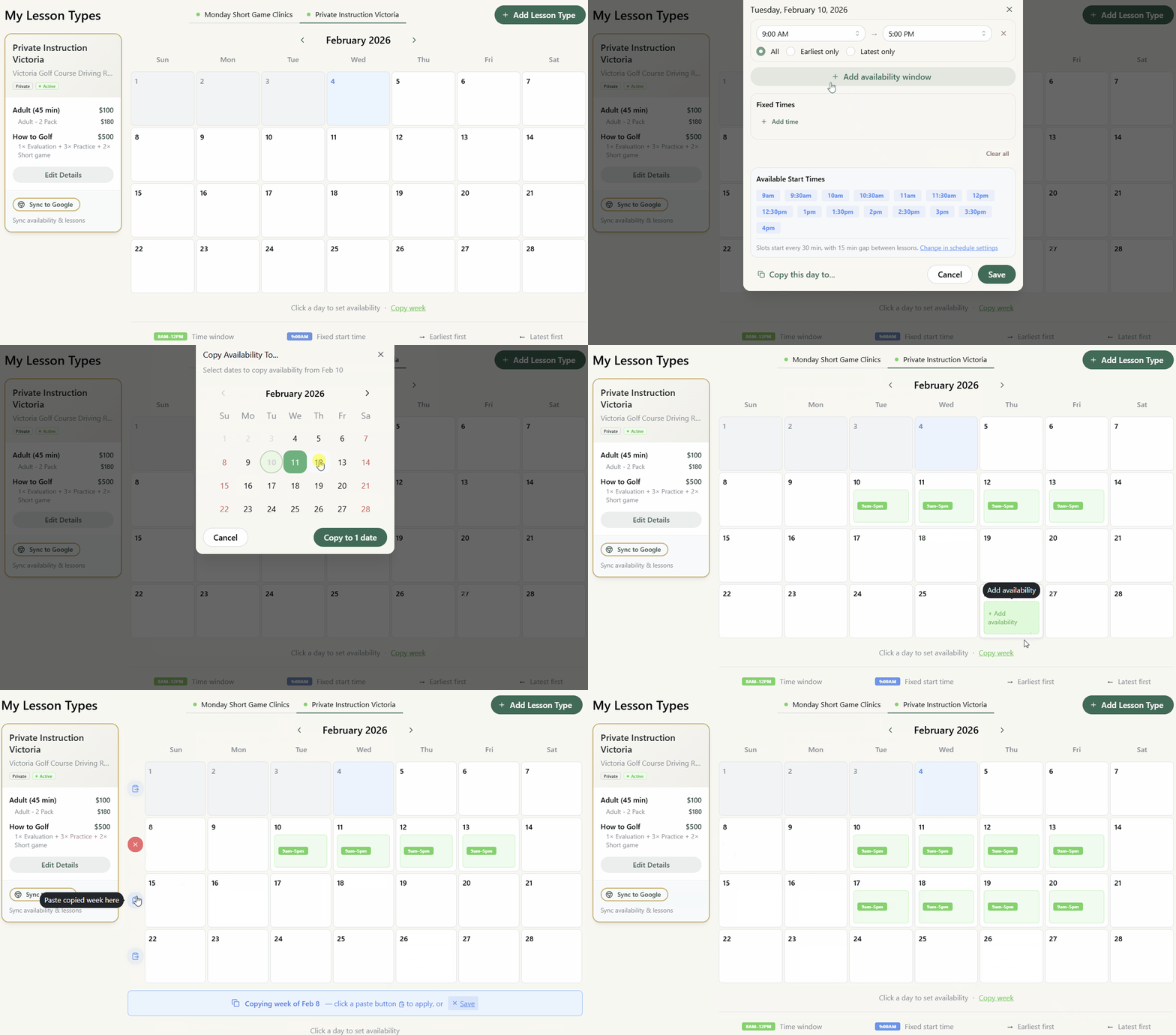
For someone with 9-5 hours who puts absolutely everything in their calendar, subtractive can work fine. For golf pros whose schedules change daily and weekly based on tournaments, weather, and club events, it's a constant battle.
Note: Both platforms offer 2-way calendar sync with Google/Outlook that can auto-block times based on your existing calendar events.
Where Acuity Falls Short for Golf Pros
1 The Package Code Friction
Even when you pay for Acuity's Standard plan, packages work differently:
Acuity: Code-Based Redemption
- → Student buys a 5-pack
- → Receives alphanumeric code (e.g., "PKG-7X9K2")
- → Must enter code each time they book
- → Lose the code? Call your pro.
SwingMatch: Profile-Linked Balances
- → Student buys a 5-pack
- → Balance attached to their profile
- → Balances are tracked automatically
- → No codes to remember or lose.
It sounds minor, but students fumbling for codes creates friction — and friction means they don’t book, book the wrong thing, or need manual intervention.
"I have for sure taught for free" — a BC-based teaching pro on tracking packages manually with Acuity
2 Simple Student Login
The best booking system is one students actually use. SwingMatch keeps the login friction-free:
One-Time Passcode Login
- → Student enters phone number or email once
- → Receives a one-time passcode
- → They're in — NO PASSWORDS to create or forget
- → Next time? Same simple flow.
No "forgot password" emails, no account creation forms, no friction. Students can book in seconds.
"I had one student with 10 duplicate profiles because they kept making errors during sign-up and weren't prompted to log in." — a BC-based teaching pro on Acuity's account system
See the full booking flow
Watch a student book a lesson from start to finish — no app, no passwords, under a minute.
3 No In-App Communication
Acuity sends automated emails and SMS reminders, but there's no way to message students directly within the platform. You're back to texting and email threads.
SwingMatch: Built-in chat keeps all student communication in one place, attached to their profile and lesson history.
4 The App Fatigue Problem
With Acuity, you're still juggling multiple apps to run your teaching business:
The Acuity Stack
Acuity
Scheduling
WhatsApp/Text
Communication
Spreadsheets
Tracking
3 apps just to manage your students.
The SwingMatch Stack
SwingMatch
Scheduling + Chat + Notes + Packages
One app. Everything in one place.
When communication stays in the app, booking stays in the app — no texting for notes or follow-ups that turn into resending links.
5 Transactional vs. Relational
Acuity treats every booking as a one-off transaction. Student books, student pays, appointment happens — done. That's fine for a haircut or a massage.
Golf instruction doesn't work that way. Your students — and members, especially at private clubs — come back week after week. You're building their swing over months, sometimes years. The platform should reflect that relationship.
Acuity: Transactional
- → Each booking stands alone
- → No lesson history or continuity
- → Communication happens outside the platform
- → Student is a "client" — one of many appointments
SwingMatch: Relational
- → Notes carry forward lesson to lesson
- → Packages create ongoing commitment
- → Chat keeps you connected between lessons
- → Student is part of your roster — a relationship you're building
When your platform understands that golf instruction is a relationship — not a transaction — everything else gets easier.
6 Built-In Discovery Tools
Getting found shouldn't require a marketing degree. SwingMatch gives you multiple ways to get in front of new students:
- → Shareable booking links: Send a direct link to your profile or a specific lesson type — students book in two taps.
- → Auto-generated QR code: Print it for the pro shop, driving range, or your business cards.
- → Marketplace listing: Students searching for lessons in your area can find you organically.
Acuity is a scheduling tool — it expects you to bring your own traffic. SwingMatch helps you get discovered.
7 Student Booking Experience
With Acuity, you build each service type from scratch. When students visit your booking page, they see a wall of text — no structure or clear pattern — and often pick the wrong one.
"Users book the wrong services all the time. I wish I could just send a link with the service prefilled." — a BC-based teaching pro
SwingMatch: Golf lesson types are pre-built and categorized (Adult, Junior, Group, Playing Lesson), so students see options they understand — and you can add custom lesson types when needed. Plus, Lesson Invites let you book the lesson for the student and optionally attach an invoice for payment, eliminating wrong-service bookings.
Feature Comparison
Comparing Acuity Standard ($27-34/mo) — the plan you need for packages — with SwingMatch.
| Feature | SwingMatch Pro | Acuity Standard |
|---|---|---|
| In-app chat | ✓ | ✗ |
| Video sharing | ✓ | ✗ |
| Marketplace | ✓ | ✗ |
| Golf-specific profiles | ✓ | ✗ |
| Booking priority | ✓ | ✗ |
| Lesson packages | ✓ | ~ |
| Gift cards | ✗ | ✓ |
| Subscriptions | ✗ | ✓ |
| Resource booking | ✗ | ✓ |
Booking Priority: Reward Your Regulars
SwingMatch lets you control who can book when:
- → Early access: Package holders see your schedule before it opens to the public
- → Day filters: Set certain days as "VIP only" or "members only" — Saturdays for package holders, weekdays open to everyone
- → Status levels: Create tiers that unlock different booking windows
Acuity treats all bookings equally — no way to reward loyalty or segment your availability.
Payments: Why We Use Stripe
Stripe is the gold standard for online payments — best-in-class UI, security, and reliability. It's more expensive than some alternatives, but it's worth it. That's why SwingMatch uses Stripe exclusively.
Acuity
- ✓ Stripe, Square, and PayPal supported
- ✓ Good if you're already using Square or PayPal
- ✗ Processing fees come out of your pocket
- ✗ No way to pass fees to students
SwingMatch
- ✓ Stripe only — the best in the business
- ✓ Option to pass fees to students
- ✓ Keep 100% of your lesson rate
- ✓ Track cash and e-transfer too
Keep 100% of Your Rate
Both platforms use Stripe (2.9% + $0.30 per transaction). With Acuity, that fee comes out of your pocket. Charge $100, receive ~$97.
SwingMatch gives you the option to add a booking fee that students pay. This covers the processing fee so you keep 100% of your lesson rate.
The math: $5,000/month in payments = ~$150 in Stripe fees. With the booking fee enabled, that $150 stays in your pocket.
If you're already using Square or PayPal and don't want to switch, Acuity gives you that flexibility. If you want the best payment experience for you and your students, SwingMatch + Stripe is the way to go.
Pricing Comparison
Acuity Scheduling
- Free: None (7-day trial only)
- Standard: $27-34/mo — packages, gift cards, subscriptions, 6 calendars
- Premium: $49-61/mo — 36 calendars, multi-timezone support, HIPAA
SwingMatch
- Free: $0 — 1 location, packages included, 10% fee on online payments only
- Pro: $37/mo (annual) — all features, no fee
- Academy: $1,499/yr — 6 Pro accounts
The Real Comparison
At a similar price point, it comes down to what you value most.
Choose SwingMatch if you want: lesson notes, in-app communication, simple student sign-on, and package tracking tied to student profiles.
Choose Acuity if you need: gift cards, subscription-based billing for ongoing programs, or resource booking for shared bays and simulators.
Who Should Use SwingMatch?
SwingMatch is built for you if you:
- ✓ Want to start free — test with real students before paying
- ✓ Sell lesson packages — included on all plans, not gated
- ✓ Want everything golf-specific — lesson types, student profiles, video sharing
- ✓ Value lesson continuity — notes and history attached to each student
- ✓ Want to be discovered — marketplace listing and QR codes
- ✓ Prefer in-app communication — keep student messages organized
Who Should Use Acuity?
Acuity is a strong choice if you:
- ✓ Need resource booking — teaching at an academy without designated bays
- ✓ Already use Squarespace — seamless integration with your existing site
- ✓ Want subscription/membership billing — for ongoing lesson programs
Real Talk: Choosing the Right Tool
Here's the honest assessment:
When to choose SwingMatch:
- You're building long-term student relationships — not just managing appointments
- You sell lesson packages — automatic tracking, no codes, no friction
- You want everything in one place — scheduling, chat, notes, packages
When to choose Acuity:
- You run a large academy with shared bays or simulators that need resource booking
- You already use Squarespace and want tight website integration
"The functionality saves me stress. It's not just a generic kind of meeting — it's really perfect for golf."
Final Thoughts
Acuity is one of the most feature-rich scheduling tools available. If you're a salon owner or wellness practitioner, it's hard to beat.
But for golf instruction specifically, the differences are in the details. Acuity treats every booking as a standalone transaction — you're managing appointments. SwingMatch treats every booking as part of an ongoing coaching relationship — you're building student journeys. That difference shows up in how packages are tracked (automatic vs. codes), how students log in (passwordless vs. account creation), and how you stay connected between lessons (in-app chat vs. external texting).
The question isn't "which has more features?" — it's "which has the right features for how I teach golf?"
Frequently Asked Questions
I'm already set up on Acuity. Is switching worth the hassle? ▼
Acuity has gift cards. Does SwingMatch? ▼
What's wrong with Acuity's package codes? ▼
My students keep creating duplicate accounts in Acuity. Does SwingMatch fix that? ▼
Do my students have to pay for SwingMatch? ▼
Try Both
The best way to decide is to try them:
- Acuity Scheduling — 7-day free trial
- SwingMatch — Free tier available, 14-day Pro trial
Set up both, see which feels right for how you actually work.
More Comparisons


Ready to Try SwingMatch?
Join instructors who've simplified their booking and grown their business.
Get Started Free